
Advanced Word Counter Online
An all-in-one solution that helps you count words, remove duplicates, and clean up text quickly right in your browser.
How to use the word counter effectively
Step 1: Input your content.
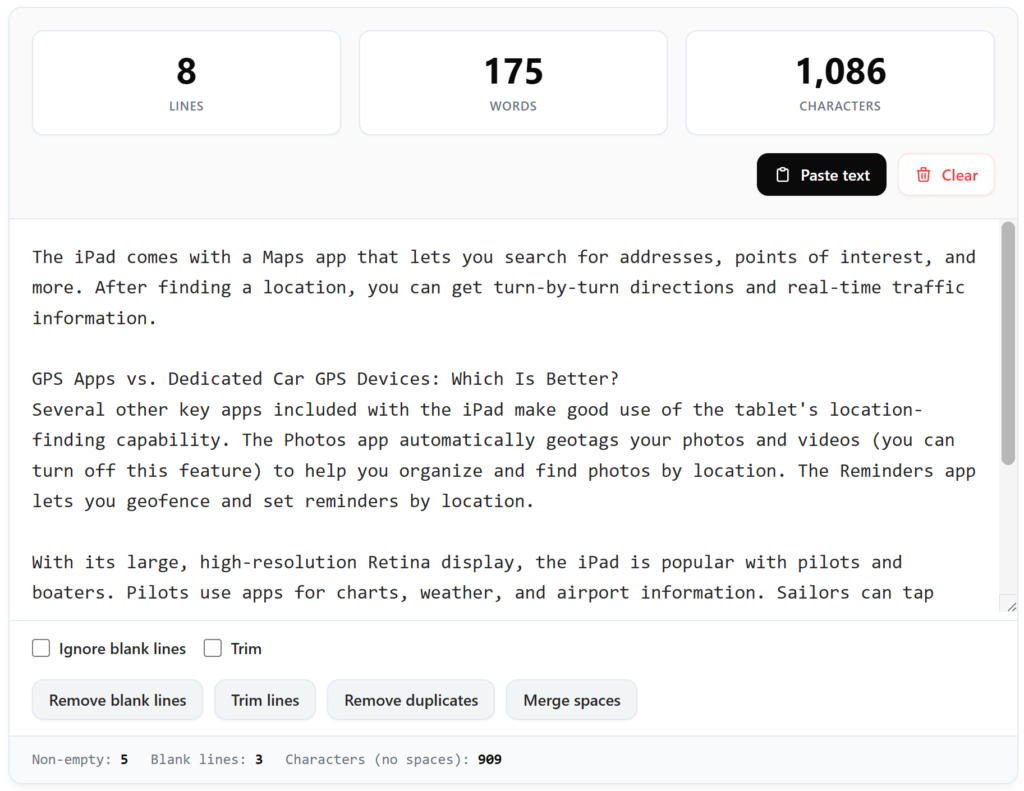
Open the tool and locate the large central text area. You can start typing your thoughts directly into the box or paste an existing draft from your clipboard by clicking the primary Paste text button.
Step 2: Monitor your statistics in real-time.
As you enter text, look at the top grid to see your total lines, words, and characters update instantly. These metrics help you stay within strict editorial limits without needing to refresh the page.
Step 3: Refine and clean your text.
Use the secondary tool buttons at the bottom to perform advanced actions. You can remove unwanted gaps, strip leading spaces, or eliminate duplicate entries with a single click to ensure your final output is perfectly formatted.
The necessity of precision in modern writing
In the fast-paced world of digital content creation, every word and character carries weight. Whether you are a dedicated blogger, a technical writer, or a student finishing a critical assignment, the ability to monitor your progress accurately is vital.
However, a standard counter often fails to address the messiness of raw data. This is where an Advanced Word Counter Online proves to be an indispensable asset. It goes beyond simple arithmetic to provide a comprehensive view of your document’s structure, allowing you to maintain the highest standards of clarity and professionalism in your work.
Beyond simple counting: A complete text analysis tool
Most users initially search for a way to track their word count to meet specific requirements for SEO or academic grading. But as any experienced editor knows, the “true” length of a document can be obscured by hidden formatting issues.
Our application functions as a robust text analysis tool that provides transparency. By looking at the footer statistics, you can differentiate between the total character count and the count excluding spaces.
This distinction is crucial for social media managers who must navigate the tight character constraints of platforms like X (formerly Twitter) or for developers who need to measure the density of their code without the overhead of white space.
Mastering the line counter with trim functionality
One of the most frustrating aspects of handling text from various sources—like PDFs, emails, or web pages—is the inconsistent use of line breaks and trailing spaces.
This tool shines as a specialized line counter with trim capabilities. By toggling the “Trim” option, you instruct the system to ignore the invisible spaces at the start and end of every line. This ensures that your line count reflects actual content rather than accidental keystrokes.
This feature is particularly helpful for data analysts who are counting entries in a list and need to ensure that an “empty-looking” line containing only a space doesn’t get counted as a valid data point.
How to clean and format text for professional results
Why spend twenty minutes manually deleting double spaces or searching for duplicate sentences when a machine can do it in milliseconds? The suite of utilities integrated into this interface allows you to clean and format text with surgical precision.
Meanwhile, the “Merge spaces” and “Remove blank lines” buttons act as a digital janitor, tidying up your paragraphs so they are ready for publication. This automated approach not only saves time but also eliminates the human error associated with manual editing.
Privacy and performance at the core
We understand that the content you write is often private or sensitive. Unlike many online utilities that send your data to a remote server for processing, this tool operates entirely on the “client-side.”
This means your text never leaves your computer or smartphone. The speed of the Advanced Word Counter Online is also a direct result of this architecture; since there is no data being uploaded or downloaded during the counting process, the feedback is instantaneous.
You can process thousands of words in the blink of an eye without worrying about your connection speed or data security.
Who is this advanced utility designed for?
The flexibility of this tool makes it a favorite across multiple industries. Freelance writers use it to ensure their articles hit the “sweet spot” for search engine optimization.
Students rely on it to format their bibliographies and check word counts for essays. Virtual assistants find the duplicate removal feature essential for managing lead lists and databases.
Even for casual users, having a reliable place to “dump” text and clean it up before sending an important email can make a significant difference in how they are perceived by others.
Conclusion
Effective writing is as much about what you take away as what you put in. By using a tool that combines counting, filtering, and formatting into one elegant interface, you are giving yourself the best possible chance at success.
The Advanced Word Counter Online is more than just a numbers game; it is a gateway to cleaner, more impactful communication. Whether you are aiming for a 700-word article or a brief social media update, let technology handle the technicalities so you can focus on the creative flow of your ideas.