
Color code table for Hex and RGB
Search colors, view codes, and copy fast
Không tìm thấy màu phù hợp
How to use this color code table
Step 1: Search for a color.
Use the search box to look up a color by name, Hex value, or RGB value. This makes the tool useful when you already know part of a color code and want to find the exact match quickly.
Step 2: Browse colors by category.
If you want to explore instead of search, you can browse colors by category. The tool includes a category menu and an expanded category view, so it is easy to move through different groups of colors without feeling lost.
Step 3: Check the color details.
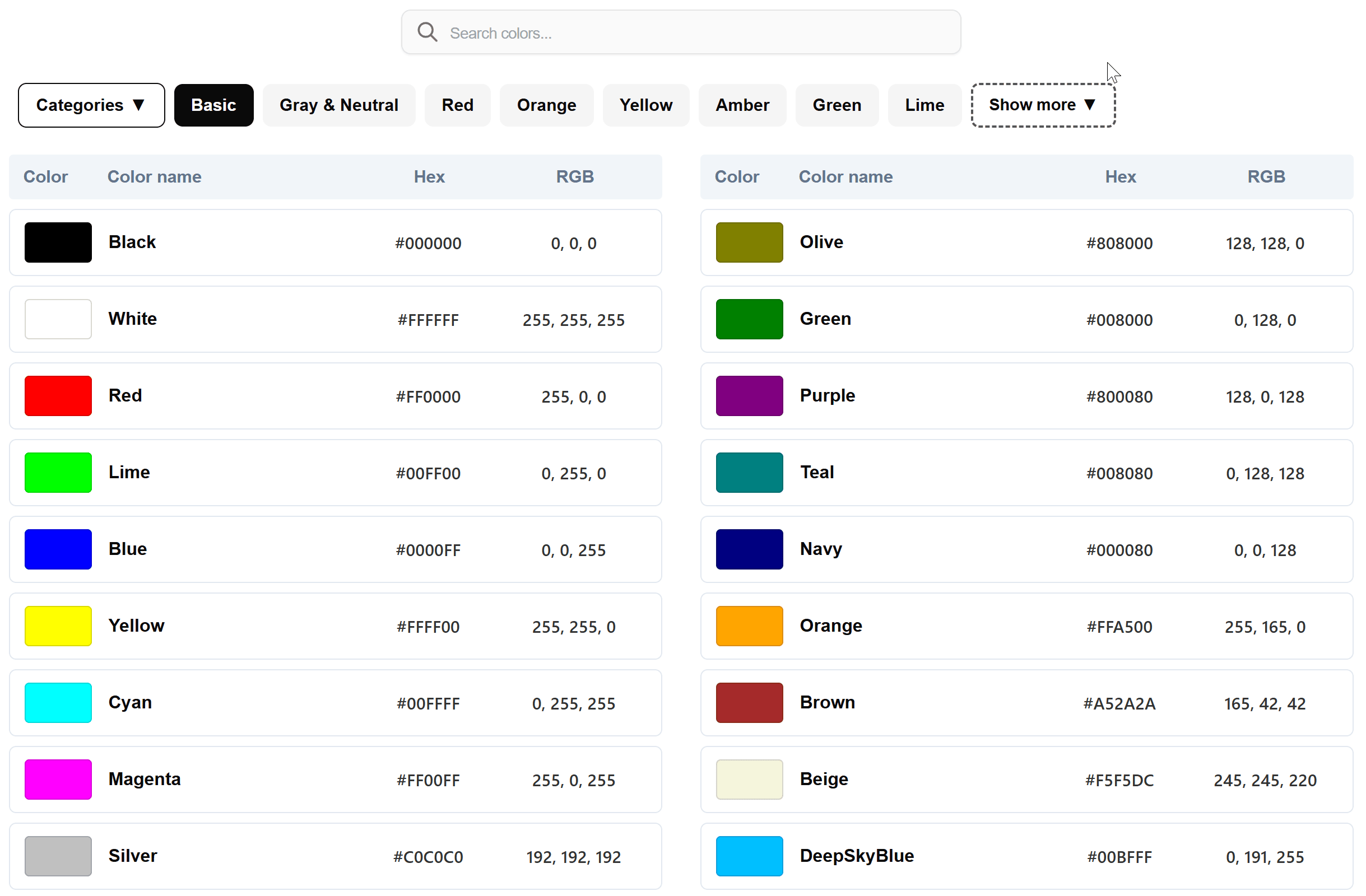
Each result shows a color swatch, the color name, the Hex code, and the RGB code together. This helps users compare colors faster and choose the format they need.
Step 4: Click to copy the code.
When you find the right color, click the Hex or RGB value to copy it. This is one of the most useful parts of the tool because it removes extra steps and saves time during design or coding work.
What is a color code table?
A color code table is a simple way to look up colors and see their code values in formats such as Hex and RGB. Instead of guessing or opening a heavy design program, users can quickly find a color, check its visual appearance, and copy the exact value they need.
For many people, this is the fastest way to work with digital colors. Whether you are editing a website, making graphics, preparing social media content, or learning design basics, a good color code table helps you move faster and make fewer mistakes.
This kind of tool is especially useful when you need a quick reference. Some users search by color name, while others already have part of a code and just want to confirm it. A well-built lookup tool supports both habits, which is why this one feels practical for everyday use.
Why this tool is useful
Many color tools are either too basic or too complicated. Some only show color names. Others focus too much on advanced editing features when users really just want to find a color and copy the code.
This tool works well because it focuses on speed and clarity. You can search, browse, compare, and copy in one place. It also supports direct lookup for hex color codes and rgb color codes, which makes it useful for both visual work and technical tasks.
Another strong point is the layout. Showing the swatch, name, Hex, and RGB in one row makes scanning much easier. That is exactly what people want when they are looking for a practical color code chart online rather than reading a long explanation.
Main features
- Fast color search by name, Hex, or RGB
- Category browsing for easier color discovery
- One-click copy for Hex and RGB values
- Clear side-by-side display of swatch, name, Hex, and RGB
- Responsive layout for easier use on smaller screens
Who should use this tool?
This tool is useful for web designers who need color values for layouts, buttons, backgrounds, and visual elements. It is also helpful for developers who often work with CSS and need quick access to accurate color codes.
Content creators and marketers can use it when preparing branded visuals, thumbnails, or social graphics. Students learning design or front-end basics may also find it easier to understand colors when the swatch and code values are shown together.
Even casual users can benefit from it. Sometimes people simply want to find a nice color and copy the value without dealing with complicated software. In that situation, a clean color code table is often the easiest solution.
When a color code table is better than a full color picker
A full color picker can be useful when you want to create a custom color from scratch, but that is not always necessary. In many cases, people just want to find an existing color quickly and copy the value.
That is where this type of tool becomes more convenient. Instead of adjusting sliders and controls, users can search, browse, and copy in seconds. For quick reference work, that can be much more efficient than opening a design app.
This is also why keywords like hex color codes and rgb color codes fit naturally with the tool. People are often not searching for a complex editor. They are searching for a faster way to look up and copy the values they need.
Conclusion
A good online color tool should save time, stay easy to use, and make color values simple to copy. This tool does that well by combining search, category browsing, and direct copy actions in one clean interface.
If you need a practical color code table for quick lookup and copying, this is the kind of tool that works well for everyday tasks. It is simple enough for casual users, but still useful for designers, developers, and anyone working with digital colors.