Two tiny numbers that can completely change what “short” means
I’ve been there—hitting ‘save’ on a social media bio or a job application, only to have the platform reject it in angry red text. It feels personal. You spent twenty minutes trimming your sentences to make them punchy, clean, and under control, but the system still says no. Maybe an editor asked you for 500 words, but the online submission form only accepts 2,500 characters. Suddenly, “length” isn’t a simple thing anymore.
This is the classic character count vs word count trap. It’s a frustrating moment because one metric tracks every tiny letter and space you type, while the other only cares about the total number of words. The difference matters more than most people realize, especially when you are writing for school, SEO, or those tight text boxes on government forms. This guide is here to help you stop treating these two numbers like twins so you can get back to your day without the “text too long” headache.
The core difference in plain English
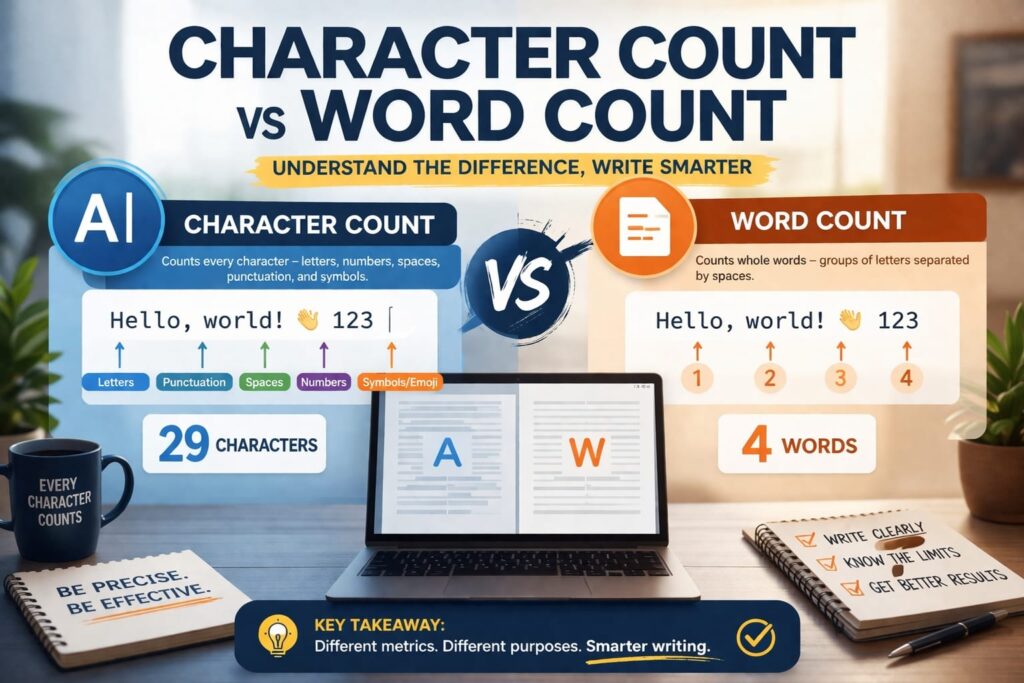
At its simplest, character count is the total number of individual bits in a text. Think of it as the physical footprint of your writing at the smallest possible level. Word count, on the other hand, is the total number of whole words—the actual units of meaning you’re putting together.
I’ve found that it helps to think of it this way: character count measures how much room you take up on a screen or a server, while word count measures how much information you are trying to share. For instance, a sentence with big, academic words like “implementation requires coordination” has a low word count but a massive character count. But if you write “I am not sure what to do yet,” you have more words but fewer characters.
Why we mix them up so often
It’s easy to blur these two because we use them for the same goal: measuring how long a piece of writing is. But the context changes everything. A student might think 500 words and 500 characters are roughly the same thing—until they realize 500 characters is barely two paragraphs.
And then there’s the freelancer struggle. You might write a blog post to hit a specific word target, but your client only cares about the character limits for the meta description. Word count feels natural because we think in ideas. Character count feels like a strict landlord because platforms like X (Twitter) or LinkedIn have hard, mechanical limits that don’t care about your “flow.”
What character count actually includes
This is where people usually get tripped up. It’s not just about the ABCs. If you’re trying to count characters with spaces, you have to look at the “hidden” parts of your text too.
- Letters and numbers: Every A, b, 7, and 9 is a character.
- Spaces: Most platforms count the space between words as a character. This is usually the biggest surprise for writers who think they are safely under a limit.
- Punctuation: Periods, commas, and quotation marks all take up a slot.
- Special symbols: Things like @, #, or even a specific symbol you copied from a list count. Emojis often count as more than one character depending on the code behind them.
- Line breaks: Sometimes, hitting “Enter” to start a new paragraph adds to the count, though this varies between tools.
How word count handles your text
Word count is usually more forgiving and way easier to guess at a glance. Most software counts any group of letters or symbols separated by a space as one word. It’s the metric of choice for essays and articles because it better reflects the depth of the content.
But even word count has its quirks. Does “well-known” count as one word or two? Does a URL count as a word? Different tools have different rules. I honestly forget which way Word or Google Docs handles hyphens half the time, so it pays to check your specific tool’s settings.
Characters vs words in real writing situations
Depending on what you are doing, one of these numbers is going to be your boss.
- Social media: Character count is king. You have a tiny box, and every letter is a luxury.
- Essays and blogs: Word count is the standard. It shows you’ve actually explored the topic rather than just fluffing up the text.
- SEO writing: You need both. You write 1,500 words for the article, but you have to stay under 160 characters for the meta description.
- Job applications: Often, those “Tell us about yourself” boxes have a character limit. If you write your response in a word processor first, keep an eye on the total count, not just the paragraph length.
Why one text can tell two different stories
You can have two different paragraphs that look similar in length on the page but have totally different counts. If you use a lot of short, punchy words, your word count goes up. If you use long, complex vocabulary, your character count spikes. This “aha” moment is key: length isn’t just about how much you wrote; it’s about how you built the sentences.
Which one should you check first?
If a platform gives you a hard limit (like an ad or a bio), always follow the character count first. If an editor or teacher asks for “1,000 words,” focus on the word count. If you’re ever confused about where you stand, using an advanced word counter online can give you both numbers at once so you don’t have to guess.
Common mistakes and quick fixes
If your text is being rejected and you don’t know why, here is a quick troubleshooting list:
- The “hidden” spaces: You might have double spaces between sentences. Trim them down.
- Tool differences: Sometimes Word and a website count things differently. Always trust the counter inside the platform where you are submitting the work.
- Character count vs word count confusion: Double-check the requirement. If it says “250 chars,” that is very different from “250 words.”
- The text looks weird: If you’ve been copying and pasting from different places, use a text case converter to clean up the formatting so it doesn’t carry over weird hidden code that bloats your count.
How to trim your text without losing the point
When you hit a character limit, don’t just delete random words. Start by swapping long words for short ones. Instead of saying “utilize,” just say “use.” Cut out filler phrases like “in order to” (just use “to”) or “at this point in time” (use “now”).
If you need to increase your word count without “padding” the writing with fluff, try adding a specific example. Explaining the “why” behind a statement usually adds meaningful length that readers actually appreciate.
Ultimately, these numbers are just tools. Once you know which one the system is looking for, you can stop fighting the text box and get back to actually writing. Good luck with your next draft!